Friday, November 29, 2019

IllegalStateException: The specified child already has a parent


If your app suddenly starts crashing with the following exception, and you have ruled out the usual suspects, its probably due to an appcompat issue.

java.lang.IllegalStateException: The specified child already has a parent. You must call removeView() on the child's parent first

I updated our andridx.appcompat version from 1.0.0 to 1.1.0 and was greeted with this crash. Unfortunately for me, that commit included multiple changes like enabling leak canary, updating the versions of various dependency libraries, and enabling multidex. So it took me some time to narrow down the offending change. The crash went away when I rolled back appcompat version to 1.0.0


But I want to use the latest version of appcompat!

In my case, the root cause was that we were reusing fragment's layout view object. In the first call to onCreateView, I'd inflate the layout xml and store the resulting view in a field. In the If the subsequent calls to this method, we would just return it instead of inflating again. Something like the following snippet. 

public View onCreateView(LayoutInflater inflater,
                         ViewGroup container, Bundle savedState) {
    if (mFragmentView != null) {
        return mFragmentView;
    }
    mFragmentView = inflater.inflate(R.layout.fragment_main, container, false);
    return mFragmentView;
}

The crash happens when `mFragmentView` is not null. This happens whenever the user navigates back to this fragment using the back button. I removed that line so that we always inflated the layout, and it fixed the crash. Looks like reusing is not encouraged in this context. I was relying on this logic to preserve the fragment's state (text etc) in some cases, so I think it is time for a 'minor' refactoring.

Removing the root view from its parent in onDestroyView also seems to work, but that sounds like cheating. I am going to keep that change on a branch until I figure out why appcompat team decided that we should not be reusing fragment layout objects like this. I couldn't find anything on StackOverflow that explains this behaviour. If you think reusing layouts is not a good idea, or know why appcompat changed its behaviour, please leave a comment.

Friday, September 27, 2013

MP4 Viewer

MP4Viewer is an open-source ISO base media file format viewer. It parses the isobmf file and displays the metadata on the console or in a separate window. It is written in python and uses pygtk for displaying the box information in a window. MP4Viewer is hosted in github

Screenshots


Usage: cd into src folder and run
$ ./showboxes.py [-h] [-o {stdout,gui}] [-e] [-c {on,off}] iso-base-media-file

Positional arguments:
  iso-base-media-file   Path to iso media file

Optional arguments:
  -o {stdout,gui}       Select output format (console or windows). Default is console.
                        TODO: Add XML output
  -c {on,off}           Turn on/off colors in stdout; on by default.
  -e                    Long arrays such as sample sizes are truncated by default.
                        This flag expands them.
  -h, --help            Help!

You need to have pygtk2.0 installed for viewing the results in a window.

The definitions of structures used in the code can be found in the publicly available standard ISO/IEC 14496-12 - ISO base media file format

Thursday, August 23, 2012

Search+

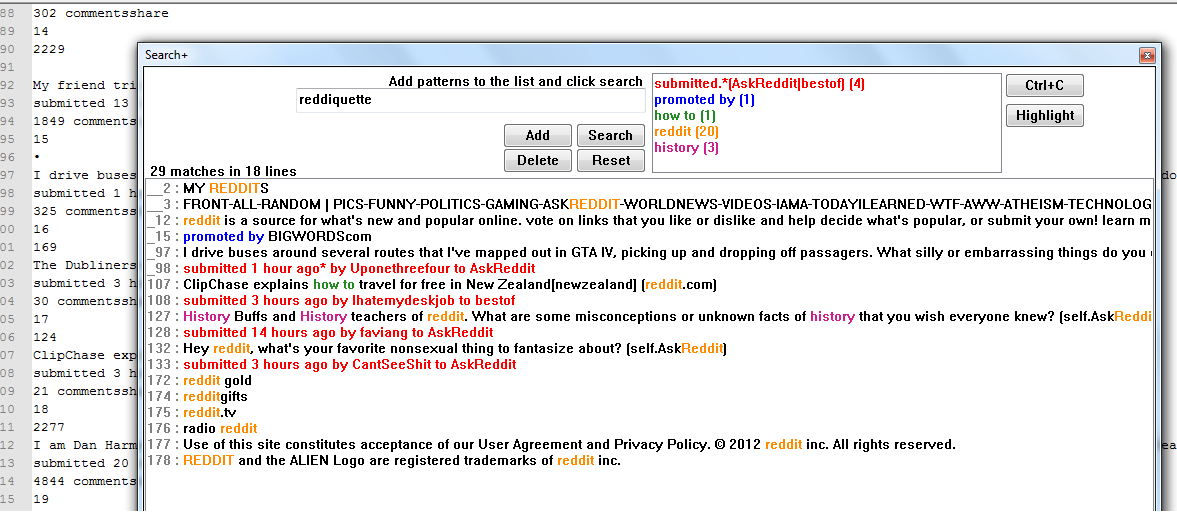
When I am not writing code, I find myself going through log files trying to make some sense out of it... er, unless I am browsing Reddit or Facebook, but I digress. The editor of choice is notepad++ as it is powerful and lightweight. However, the search functionality in notepad++ sometimes fails to meet my needs as I end up searching for a word, bookmark it and search for another word from that point, and then a third one from there and so on until I give up and copy the file to a Linux machine and grep for it in a loop. Things would be easier if one could search for multiple keywords at the same time and filter out the matching lines in npp itself. Maybe it is my poor googfu, but I couldn't find anything that would let me do that; but what I did find was that notepad++ provides a nice plugin interface with a decent documentation. So I decided to get my hands dirty and write a plugin that does this. I have been using it for sometime and found it helpful so I thought I'd share it.

As described above, Search+ is a notepad++ plugin that lets you search for multiple keywords in a single shot. You can specify a list of patterns and filter out all lines from the current document that match any of the keywords in that list.
  • Keywords are interpreted as regex
  • Search is case insensitive
  • Matching lines are listed in a separate ListBox
  • Option to highlight matched strings in the original document
Here is a screenshot of the plugin in action(click the image for full size).


  • You can download Search+ from Google code
  • For more information regarding installation and usage, read this wiki page.
  • Search+ is written in C++ and this is kinda my first work in that language. Feel free to browse the source code and point out any issues there :-)
In case of any issues or suggestions, please leave a comment here. And if you find this useful, do spread the word.

Update (December 2015): The project was initially hosted in google code; back then, you could just download the dll and put it in the npp plugins folder to install this. After moving the hosting to github when google discontinued their code hosting service, I haven't had a chance to add compiled dll to github. As of now, you'd have to download the source code and compile it yourself. I don't have access to windows compiler as I am working in Linux nowadays.

Friday, January 13, 2012

gstreamer appsrc in action

Lately I have been exploring gstreamer to play AV from a transport stream demultiplexer that I am developing (mostly for fun, slightly for work). After some research (read googling for play video using gstreamer), I concluded that gstreamer-appsrc is the way to go. Since I had a hard time finding a working example in the Internet on using this plugin, I thought I would share my test application here. If you are new to gstreamer, keep in mind that I am only couple of days ahead of you and I might have overlooked or missed even basic things in this post; and if you in fact know gstreamer, feel free to mention any such omissions you notice here so that I can correct them.

Here is a quick intro to gstreamer for new comers. It is a media framework based on plugins - you can read all about gstreamer here. That page says prior knowledge of glib and gobject is assumed; while proper knowledge of these two will help you progress faster, I didn't know either and I survived. The point is, you can (and you have to) learn those parallelly. In a nutshell, you work on a gstreamer pipeline which is basically a series of plugins where each one takes its input from the previous plugin, does something with it and gives the output to the next one. The data is passed around in buffers through the source and sink pads of the plugins. Usually at the left end of a pipeline there will be a pure source (like filesrc that reads data from a file and feeds the pipeline) and the last one would be a pure sink that plays the media. The typical steps in creating a gstreamer based player can be summarized as:
  1. Create your elements and set their properties, signal handlers and callbacks
  2. Add them to a bin (pipeline is a bin)
  3. Get a reference to the bin's bus and add bus callback for messages - at the minimum, an application should handle error messages and end of stream messages so as to stop the main loop on error and eos.
  4. Link their source and sink pads in the correct order
  5. Set the state of bin to playing and start the glib main loop.
You can find a gstreamer helloworld application and its explanation here. It uses a playbin, a readymade pipeline that does most of the work for us. It is good enough as long as you are not producing any media. But if you are producing some media data in your application and you need to play it using gstreamer, you need a way to feed this data to the pipeline. That is where appsrc comes into picture. The appsrc element allows applications to inject buffers into a pipeline.

There is this gstreamer appsrc example code in github, but unfortunately it didn't work for me - and based on the comment in that page, I am not the only one. It uses udpsink to stream data over a network. Since I just wanted to play it on my desktop, I replaced it with an xvimagesink which is used by most of the desktop based gstreamer video examples. But that didn't make any difference either - whenever I run the code, it exits with the following error:

ERROR from element mysource: Internal data flow error.
Debugging info: gstbasesrc.c(2582): gst_base_src_loop (): /GstPipeline:pipeline0/GstAppSrc:mysource:
streaming task paused, reason not-negotiated (-4)

As usual I resorted to StackOverflow for an answer, but apparently there aren't many gstreamer enthusiasts roaming in there. After earning my first tumbleweed badge for this question, I decided to do it myself. I started with this simple gstreamer AVI player. It uses the following pipeline:

filesrc -> avidemux -> decodebin -> customfilter -> ffmpegcolorspace -> videoscale -> autovideosink  

This pipeline is sort of self explanatory. The filesrc reads the avi file and passes the data to the demux where it gets split into audio and video. To keep things short, let us ignore audio. The video data is decoded in decodebin and the raw data is processed further and displayed using the last three plugins (gotta admit that I don't know nittygritties of those three; there are detailed websites out there explaining them - help yourself). If you look at the code in that page, you can see that not all the elements are linked together at the beginning. This is because in some plugins the source (output) pads are created dynamically based on the input data. So you have to listen for appropriate signals like pad-added on such elements and do the linking from the callbacks.

Since we are dealing with mpeg video, we don't need avidemux. And we can replace videoscale and autovideosink with an xvimagesink for the sake of brevity. So it comes down to replacing filesrc with an appsrc and feeding the data to the decoder. Let us create the elements:

/* Start by creating a new pipeline and the elements */
app->pipeline = (GstPipeline*)gst_pipeline_new("mypipeline");

/* Add bus callback */
bus = gst_pipeline_get_bus(app->pipeline);
gst_bus_add_watch(bus, (GstBusFunc)bus_callback, app);
gst_object_unref(bus);

/* Add signal handlers on appsrc */
g_signal_connect(app->src, "need-data", G_CALLBACK(start_feed), app);
g_signal_connect(app->src, "enough-data", G_CALLBACK(stop_feed), app);


/* Create the elements */
app->src = (GstAppSrc*)gst_element_factory_make("appsrc", "mysrc");
app->decoder = gst_element_factory_make("decodebin", "mydecoder");
app->ffmpeg = gst_element_factory_make("ffmpegcolorspace", "myffmpeg");
app->xvimagesink = gst_element_factory_make("xvimagesink", "myvsink");

/* Add elements to the pipeline */
gst_bin_add_many(GST_BIN(app->pipeline), (GstElement*)app->src, app->decoder, app->ffmpeg, app->xvimagesink, NULL);

/* Link them together - this should be done after adding to the bin */

if(!gst_element_link((GstElement*)app->src, app->decoder)){
    g_warning("failed to link src anbd decoder");
}

if(!gst_element_link(app->ffmpeg, app->xvimagesink)){
    g_warning("failed to link ffmpeg and xvsink");
}

/* Note that we haven't linked decoder to color-space element 
- that's done from pad-added signal callback. */
g_signal_connect(app->decoder, "pad-added", G_CALLBACK(on_pad_added), app->decoder);


Applications can feed the data to appsrc plugin using two methods; by calling gst_app_src_push_buffer function or by emitting push-buffer signals. I used the first approach since I am not fluent with signals and it gave intermittent warning messages while running. We start by writing a read_data function that reads chunks of data from a global file pointer and creates a GstBuffer and pushes them to the appsrc.

static gboolean read_data(gst_app_t *app)
{
    GstBuffer *buffer;
    guint8 *ptr;
    gint size;
    GstFlowReturn ret;

    ptr = g_malloc(BUFF_SIZE);
    g_assert(ptr);

    size = fread(ptr, 1, BUFF_SIZE, app->file);
    
    if(size == 0){
        ret = gst_app_src_end_of_stream(app->src);
        g_debug("eos returned %d at %d\n", ret, __LINE__);
        return FALSE;
    }

    buffer = gst_buffer_new();
    GST_BUFFER_MALLOCDATA(buffer) = ptr;
    GST_BUFFER_SIZE(buffer) = size;
    GST_BUFFER_DATA(buffer) = GST_BUFFER_MALLOCDATA(buffer);

    ret = gst_app_src_push_buffer(app->src, buffer);

    if(ret !=  GST_FLOW_OK){
        g_debug("push buffer returned %d for %d bytes \n", ret, size);
        return FALSE;
    }

    if(size != BUFF_SIZE){
        ret = gst_app_src_end_of_stream(app->src);
        g_debug("eos returned %d at %d\n", ret, __LINE__);
        return FALSE;
    }

    return TRUE;
}

The appsrc element emits mainly two signals namely need-data and enough-data to tell the application to start and stop feeding data. We need to listen to these callbacks. In the need-data callback, we add our read_data function as an idle handler to the main loop. The glib main loop will call this function from its main loop. When appsrc emits enough-data signal, we just remove this idle handler so that it is not called anymore. The boolean return value of read_data function is used by the main loop to decide whether to call it in the future - so we should return FALSE in case of any errors in pushing the data or we reach end of file.

static void start_feed (GstElement * pipeline, guint size, gst_app_t *app)
{
    if (app->sourceid == 0) {
        /* add idle handle to the main loop */
        app->sourceid = g_idle_add ((GSourceFunc) read_data, app);
    }
}

static void stop_feed (GstElement * pipeline, gst_app_t *app)
{
    if (app->sourceid != 0) {
        GST_DEBUG ("stop feeding");
        g_source_remove (app->sourceid);
        app->sourceid = 0;
    }
}

Now, start the pipeline, create a main loop and run it
gst_element_set_state((GstElement*)app->pipeline, GST_STATE_PLAYING);
app->loop = g_main_loop_new(NULL, FALSE);
g_main_loop_run(app->loop);

/* the previous call will return when we call quit from bus_callback - 
set the pipeline to null to do the cleanup */
gst_element_set_state((GstElement*)app->pipeline, GST_STATE_NULL);


And that's it, we got appsrc working. The source should be compiled using appropriate cflags and libs - you can use package config for getting them.

gcc -o testapp gst-testapp.c `pkg-config --cflags --libs  gstreamer-0.10 gstreamer-app-0.10`

If you get compiler or linker errors related to gstreamer, you probably don't have the necessary gstreamer development libraries installed. You can apt-get them using:

sudo apt-get install libgstreamer0.10-dev
sudo apt-get install libgstreamer-plugins-base0.10-dev

Here is the full source code.

/* 
  I don't know if it is syntax highlighter or blogger, but I can't seem to 
  put angle brackets around header file names properly.
*/
#include stdio.h
#include gst/gst.h
#include gst/app/gstappsrc.h

typedef struct {
 GstPipeline *pipeline;
 GstAppSrc *src;
 GstElement *sink;
 GstElement *decoder;
 GstElement *ffmpeg;
 GstElement *xvimagesink;
 GMainLoop *loop;
 guint sourceid;
 FILE *file;
}gst_app_t;

static gst_app_t gst_app;

#define BUFF_SIZE (1024)

static gboolean read_data(gst_app_t *app)
{
 GstBuffer *buffer;
 guint8 *ptr;
 gint size;
 GstFlowReturn ret;

 ptr = g_malloc(BUFF_SIZE);
 g_assert(ptr);

 size = fread(ptr, 1, BUFF_SIZE, app->file);
 
 if(size == 0){
  ret = gst_app_src_end_of_stream(app->src);
  g_debug("eos returned %d at %d\n", ret, __LINE__);
  return FALSE;
 }

 buffer = gst_buffer_new();
 GST_BUFFER_MALLOCDATA(buffer) = ptr;
 GST_BUFFER_SIZE(buffer) = size;
 GST_BUFFER_DATA(buffer) = GST_BUFFER_MALLOCDATA(buffer);

 ret = gst_app_src_push_buffer(app->src, buffer);

 if(ret !=  GST_FLOW_OK){
  g_debug("push buffer returned %d for %d bytes \n", ret, size);
  return FALSE;
 }

 if(size != BUFF_SIZE){
  ret = gst_app_src_end_of_stream(app->src);
  g_debug("eos returned %d at %d\n", ret, __LINE__);
  return FALSE;
 }

 return TRUE;
}

static void start_feed (GstElement * pipeline, guint size, gst_app_t *app)
{
 if (app->sourceid == 0) {
  GST_DEBUG ("start feeding");
  app->sourceid = g_idle_add ((GSourceFunc) read_data, app);
 }
}

static void stop_feed (GstElement * pipeline, gst_app_t *app)
{
 if (app->sourceid != 0) {
  GST_DEBUG ("stop feeding");
  g_source_remove (app->sourceid);
  app->sourceid = 0;
 }
}

static void on_pad_added(GstElement *element, GstPad *pad)
{
 GstCaps *caps;
 GstStructure *str;
 gchar *name;
 GstPad *ffmpegsink;
 GstPadLinkReturn ret;

 g_debug("pad added");

 caps = gst_pad_get_caps(pad);
 str = gst_caps_get_structure(caps, 0);

 g_assert(str);

 name = (gchar*)gst_structure_get_name(str);

 g_debug("pad name %s", name);

 if(g_strrstr(name, "video")){

  ffmpegsink = gst_element_get_pad(gst_app.ffmpeg, "sink");
  g_assert(ffmpegsink);
  ret = gst_pad_link(pad, ffmpegsink);
  g_debug("pad_link returned %d\n", ret);
  gst_object_unref(ffmpegsink);
 }
 gst_caps_unref(caps);
}

static gboolean bus_callback(GstBus *bus, GstMessage *message, gpointer *ptr)
{
 gst_app_t *app = (gst_app_t*)ptr;

 switch(GST_MESSAGE_TYPE(message)){

 case GST_MESSAGE_ERROR:{
  gchar *debug;
  GError *err;

  gst_message_parse_error(message, &err, &debug);
  g_print("Error %s\n", err->message);
  g_error_free(err);
  g_free(debug);
  g_main_loop_quit(app->loop);
 }
 break;

 case GST_MESSAGE_WARNING:{
  gchar *debug;
  GError *err;
  gchar *name;

  gst_message_parse_warning(message, &err, &debug);
  g_print("Warning %s\nDebug %s\n", err->message, debug);

  name = GST_MESSAGE_SRC_NAME(message);

  g_print("Name of src %s\n", name ? name : "nil");
  g_error_free(err);
  g_free(debug);
 }
 break;

 case GST_MESSAGE_EOS:
  g_print("End of stream\n");
  g_main_loop_quit(app->loop);
  break;

 case GST_MESSAGE_STATE_CHANGED:
  break;

 default:
  g_print("got message %s\n", \
   gst_message_type_get_name (GST_MESSAGE_TYPE (message)));
  break;
 }

 return TRUE;
}

int main(int argc, char *argv[])
{
 gst_app_t *app = &gst_app;
 GstBus *bus;
 GstStateChangeReturn state_ret;

 if(argc != 2){
  printf("File name not specified\n");
  return 1;
 }

 app->file = fopen(argv[1], "r");

 g_assert(app->file);

 gst_init(NULL, NULL);

 app->pipeline = (GstPipeline*)gst_pipeline_new("mypipeline");
 bus = gst_pipeline_get_bus(app->pipeline);
 gst_bus_add_watch(bus, (GstBusFunc)bus_callback, app);
 gst_object_unref(bus);

 app->src = (GstAppSrc*)gst_element_factory_make("appsrc", "mysrc");
 app->decoder = gst_element_factory_make("decodebin", "mydecoder");
 app->ffmpeg = gst_element_factory_make("ffmpegcolorspace", "myffmpeg");
 app->xvimagesink = gst_element_factory_make("xvimagesink", "myvsink");

 g_assert(app->src);
 g_assert(app->decoder);
 g_assert(app->ffmpeg);
 g_assert(app->xvimagesink);

 g_signal_connect(app->src, "need-data", G_CALLBACK(start_feed), app);
 g_signal_connect(app->src, "enough-data", G_CALLBACK(stop_feed), app);
 g_signal_connect(app->decoder, "pad-added", 
  G_CALLBACK(on_pad_added), app->decoder);

 gst_bin_add_many(GST_BIN(app->pipeline), (GstElement*)app->src, 
  app->decoder, app->ffmpeg, app->xvimagesink, NULL);

 if(!gst_element_link((GstElement*)app->src, app->decoder)){
  g_warning("failed to link src anbd decoder");
 }

 if(!gst_element_link(app->ffmpeg, app->xvimagesink)){
  g_warning("failed to link ffmpeg and xvsink");
 }

 state_ret = gst_element_set_state((GstElement*)app->pipeline, GST_STATE_PLAYING);
 g_warning("set state returned %d\n", state_ret);

 app->loop = g_main_loop_new(NULL, FALSE);

 g_main_loop_run(app->loop);

 state_ret = gst_element_set_state((GstElement*)app->pipeline, GST_STATE_NULL);
 g_warning("set state null returned %d\n", state_ret);

 return 0;
}

This just shows appsrc in action - the real work is integrating it with your application. Remember that g_main_loop_run will return only when you call g_main_loop_quit - so you might want to call it from its own thread.

If you find it helpful or wrong, please share your feedback.

Wednesday, October 6, 2010

Redmine, Apache and passenger

We've been running Redmine on Apache2 with mode-passenger for a while. Everything was running smooth until yesterday, when we installed PHP and PostgreSQL on the same server. Redmine started giving Connection refused messages upon installing these. I promptly restarted Apache, to see the following error message:

Invalid command 'RailsEnv', perhaps misspelled or defined by a module not included in the server configuration

Staring at Apache configuration files for half an hour didn't really help, as I hardly know anything about them. I resorted to Google as usual and it took a while to figure out the issue. Apparently, the passenger module somehow got disabled when PHP and PostgreSQL were installed. Thanks to this page in Redmine forums, I was able to fix it by enabling it back. Just in case anyone have the same issue, here's how to do it:

# install passenger (if you don't have it already). I'm sure I already had 
# it installed, but the apt-get downloaded and installed it again. 
# I say do it anyway.

sudo apt-get install libapache2-mod-passenger

#enable passenger explicitly

sudo a2enmod passenger

#restart apache

sudo /etc/init.d/apache2 restart

# Check redmine: 
# Still not working....? I'm sorry, the problem is somewhere else :(

Wednesday, January 6, 2010

Icons in Flex MenuBar

I came across this strange behavior (I'm not sure if it qualifies to be called a bug, but it definitely is not a feature) in Flex while trying to add icons to the MenuBar control.

The icons are displayed properly if both the MenuBar and the icon-embed variables are declared in the main application class. But if they are nested inside another component, only the top level menu-items' icons are displayed - child menu items' icons are not displayed.

After some debugging I realized that only the top-level menu items are displayed using the itemToIcon method of the MenuBar class; child menu-items are displayed using the itemToIcon method of the Menu class. The problem here is that even though both of these methods use document[data[iconField]] to grab the icon-embed class, the document properties of these two objects point to different items. The document property of the MenuBar points correctly to the enclosing component (MyPanel). Whereas, for some reason that I don't understand, the document property for nested Menu points to the MainApplication class.

In short, while rendering icons of a MenuBar within a component, flex searches the component class for icons of top-level menu items, and the main-application class for icons of its nested menu items. The obvious workaround is to embed all icons to public static const in some class and to keep appropriate references to them in both application and component classes. But that doesn't sound so pretty to me (even though that's what I am doing now). Does anyone know better?

Here is example code and screenshots to demonstrate the issue:

<!--The main Application class-->
<mx:Application xmlns:mx="http://www.adobe.com/2006/mxml" layout="vertical"
   creationComplete="create()" xmlns:local="*">
   <mx:Label text="MenuBar in the Application works fine"/>
   <mx:MenuBar id="menuBar" top="10" left="10"
       dataProvider="{menuBarCollection}" labelField="@label"
       iconField="@icon" />

   <local:MyPanel/>

   <mx:Script>
       <![CDATA[
           import mx.collections.XMLListCollection;

           [Bindable]
           protected var menuBarCollection:XMLListCollection;

           [Embed(source="assets/icon_one.png")]
           public var iconOne_App:Class;

           [Embed(source="assets/icon_two.png")]
           public var iconTwo_App:Class;

           private function create():void
           {
               menuBarCollection = new XMLListCollection(XMLList(
                   '<menuitem label="One" icon="iconOne_App">' +
                       '<menuitem label="Two" icon="iconTwo_App"/>' +
                       '<menuitem label="Three" icon="iconTwo_App"/>' +
                   '</menuitem>'
               ));
           }
       ]]>
   </mx:Script>
</mx:Application>

MenuBar in the Application

<!--MyPanel.mxml-->
<mx:Panel xmlns:mx="http://www.adobe.com/2006/mxml" height="144"
   creationComplete="create();" horizontalAlign="center" verticalAlign="middle">
   <mx:Text text="MenuBar inside a component doesn't display icons properly"/>
   <mx:MenuBar id="menuBar" top="10" left="10"
       dataProvider="{menuBarCollection}" labelField="@label"
       iconField="@icon" />
   <mx:Script>
       <![CDATA[
           import mx.collections.XMLListCollection;

           [Bindable]
           protected var menuBarCollection:XMLListCollection;

           [Embed(source="assets/icon_one.png")]
           public var iconOne_Panel:Class;

           [Embed(source="assets/icon_two.png")]
           public var iconTwo_Panel:Class;

           private function create():void
           {
               menuBarCollection = new XMLListCollection(XMLList(
                   //top level item referring to component
                   //this icon is displayed
                   '<menuitem label="ParentIcon_panel" icon="iconOne_Panel">' +

                       //nested item referring to component
                       //this icon is not displayed
                       '<menuitem label="ChildIcon_panel" icon="iconTwo_Panel"/>' +

                       //nested item referring to application
                       //this icon is displayed
                       '<menuitem label="ChildIcon-app" icon="iconTwo_App"/>' +
                   '</menuitem>' +

                   //top level item referring to Application
                   //this icon is not displayed
                   '<menuitem label="ParentIcon_app" icon="iconOne_App"/>'
               ));
           }
       ]]>
   </mx:Script>
</mx:Panel>

MenuBar inside a Component

Wednesday, November 18, 2009

Generating getters and setters in Flex Builder

Fine print: This post discusses not so thoroughly tested regexes that the author used to edit his source code (and to fulfill his newly found affection for exploring regular expressions). Author cannot be held responsible or abused for the damages that these regexes might incur to your code and/or job. Eclipse has this cool feature that lets you generate getters and setters for the variables in your source code. Flex Builder 3, though based on Eclipse platform, doesn't have such an option. For those interested, here is a way to generate get and set methods for your ActionScript private/protected variables using the inbuilt Find/Replace and regular expressions. Though it assumes that you're using tabs for indenting the code (which is the default in FB), you can modify it for spaces easily. Open the Find/Replace window (Ctrl-F) and add the following regular expression to the Find field.

^((\t)+)(?:private|protected)\s+var\s+_(\w+):(\w+)\s*;\s*(\n)

Now add the following pattern to the Replace field.

$0$5$1public function set $3(value:$4):void$5$1{$5$1$2_$3 = value;$5$1}$5$5$1public function get $3():$4$5$1{$5$1$2return _$3;$5$1}$5$5

Don't forget to select the Regular expressions check box in the options box. The replace pattern doesn't accept any meta characters other than $, and hence we need to capture a tab and a new-line using the regex itself. Now use the Find, (Alt-N), Replace (Alt-R) and Replace/Find (Alt-D) to generate get and set methods for the required properties. If you want to generate get/set methods for all the private/protected variables in your class - and you're really courageous, use Replace All (Alt-A).

Tuesday, October 27, 2009

StackOverflow Reputation Tracker

Did I say that I've gotten addicted to StackOverflow? Here is a snippet of shell script to check your StackOverflow reputation from the comfort of your Linux console. Replace 165297 with your user ID.
#!/bin/sh 
json=$(curl -s http://stackoverflow.com/users/flair/165297.json) 
echo $json | sed 's/.*"reputation":"\([0-9,]\{1,\}\)".*/\1/' | sed s/,//
Haven't tested this for other sites in the trilogy, but I believe this would work for all the three sites and also the meta. Now onto writing an AIR app that would track reps and alert about new questions with your favorite tags... :)

Friday, April 3, 2009

VerifyError 1102

VerifyError: Error #1102: Illegal default value for type * If you ever get this rather unusual run-time error, here's what to do. If you are using default values for arguments in a method's declaration part, make sure that the types match well. For instance, I wanted to explicitly call an event handler from the code and hence used null as the default value for the event parameter - only I typed it false instead of null (yeah, its Friday evening here). I don't know why the compiler thinks its okay to assign false (or a String or AnyThing) to an Event variable. private function init(e:Event = false):void So check your code for something silly like this, fix it and you are good to go. This run-time error is strange because livedocs says that "The VerifyError class represents an error that occurs when a malformed or corrupted SWF file is encountered". So you conclude that the SWF is having its issues on the Friday evening and rebuild the project to fix it. But no matter what you do to fix the "corrupted" SWF, you will get the same error again and again. Also, Flex doesn't show the corresponding MXML/AS file name or the line of code that caused this error, which it normally does with errors. It in fact traces the call stack, but that's not quite useful. One would normally expect the bug to be in the top most method of the call stack or in a method called from that. But here it seems that the top most method in the stack trace is the method that accesses any method/property from the buggy class for the first time in application. Adobe's documentation on Flex run-time errors says that "ActionScript in the SWF is invalid. If you believe that the file has not been corrupted, please report the problem to Adobe." - not really helpful either. But fortunately this is not even a run-time error - or this wouldn't have been one, had the compiler done its job well. And it turns out that the error message - Illegal default value for type * - is in fact correct. Compiler will detect wrong assignments in the case of basic types. For instance, if it was function(t:String = 3) you will get a compiler error 1184: Incompatible default value of type int where String is expected along with file name and the exact line of code that went wrong. But if its anything other than basic types, compiler just ignores it and you get this scary "malformed SWF". Hope this helps someone.
Links added with LinkIt

Wednesday, February 25, 2009

Hello World

This, ladies and gentlemen, would be my attempted English blog. (I am attempting one in Malayalam here). Be warned that this is the first time I am writing anything completely by myself in English - other than exam papers and assignments, of course. Err, I can't really make that claim - quite a few of them were actually not completely written by myself ;) The first question that I had upon deciding to start this blog was what would I write about, and unfortunately that still remains unanswered. Normally new bloggers complain about not having anything to write about after few posts; but I'm doing that in my very first post itself - quite impressive, isn't it? I guess I would start by jotting down some FYIs about Flash/Flex that I had to learn the hard way.
Links added with LinkIt