When I am not writing code, I find myself going through log files trying to make some sense out of it... er, unless I am browsing Reddit or Facebook, but I digress. The editor of choice is notepad++ as it is powerful and lightweight. However, the search functionality in notepad++ sometimes fails to meet my needs as I end up searching for a word, bookmark it and search for another word from that point, and then a third one from there and so on until I give up and copy the file to a Linux machine and grep for it in a loop. Things would be easier if one could search for multiple keywords at the same time and filter out the matching lines in npp itself. Maybe it is my poor googfu, but I couldn't find anything that would let me do that; but what I did find was that notepad++ provides a nice plugin interface with a decent documentation. So I decided to get my hands dirty and write a plugin that does this. I have been using it for sometime and found it helpful so I thought I'd share it.

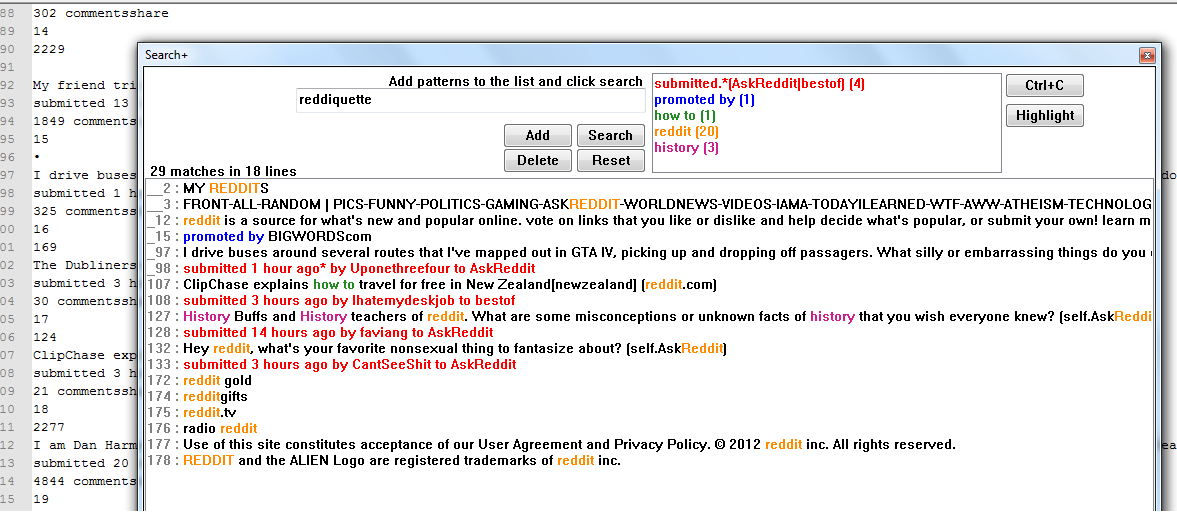
As described above, Search+ is a notepad++ plugin that lets you search for multiple keywords in a single shot. You can specify a list of patterns and filter out all lines from the current document that match any of the keywords in that list.
- Keywords are interpreted as regex
- Search is case insensitive
- Matching lines are listed in a separate ListBox
- Option to highlight matched strings in the original document
Here is a screenshot of the plugin in action(click the image for full size).
- You can download Search+ from Google code
- For more information regarding installation and usage, read this wiki page.
- Search+ is written in C++ and this is kinda my first work in that language. Feel free to browse the source code and point out any issues there :-)
In case of any issues or suggestions, please leave a comment here. And if you find this useful, do spread the word.
Update (December 2015): The project was initially hosted in google code; back then, you could just download the dll and put it in the npp plugins folder to install this. After moving the hosting to github when google discontinued their code hosting service, I haven't had a chance to add compiled dll to github. As of now, you'd have to download the source code and compile it yourself. I don't have access to windows compiler as I am working in Linux nowadays.
