When I am not writing code, I find myself going through log files trying to make some sense out of it... er, unless I am browsing Reddit or Facebook, but I digress. The editor of choice is notepad++ as it is powerful and lightweight. However, the search functionality in notepad++ sometimes fails to meet my needs as I end up searching for a word, bookmark it and search for another word from that point, and then a third one from there and so on until I give up and copy the file to a Linux machine and grep for it in a loop. Things would be easier if one could search for multiple keywords at the same time and filter out the matching lines in npp itself. Maybe it is my poor googfu, but I couldn't find anything that would let me do that; but what I did find was that notepad++ provides a nice plugin interface with a decent documentation. So I decided to get my hands dirty and write a plugin that does this. I have been using it for sometime and found it helpful so I thought I'd share it.

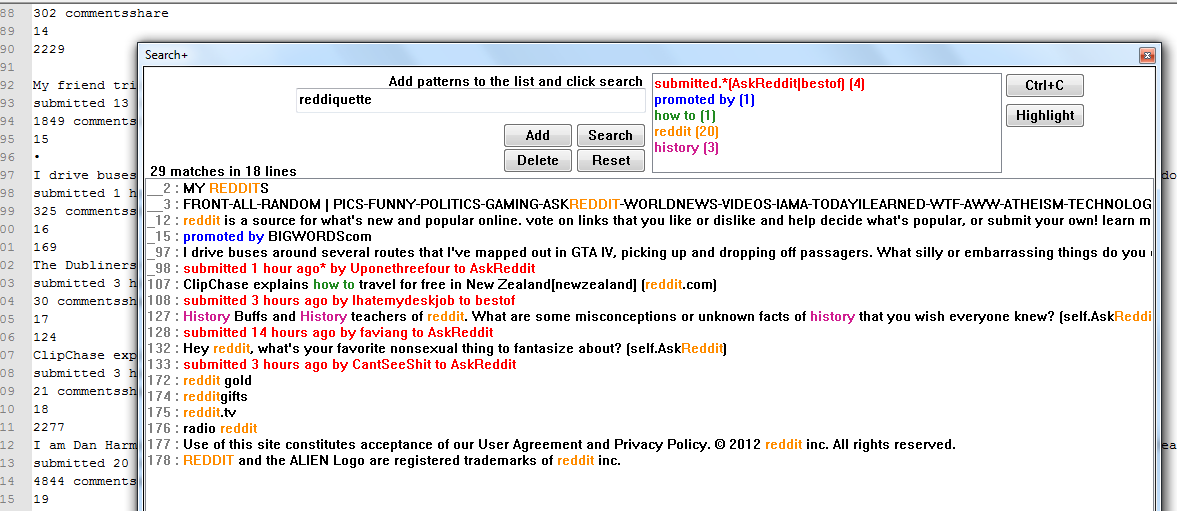
As described above, Search+ is a notepad++ plugin that lets you search for multiple keywords in a single shot. You can specify a list of patterns and filter out all lines from the current document that match any of the keywords in that list.
- Keywords are interpreted as regex
- Search is case insensitive
- Matching lines are listed in a separate ListBox
- Option to highlight matched strings in the original document
Here is a screenshot of the plugin in action(click the image for full size).
- You can download Search+ from Google code
- For more information regarding installation and usage, read this wiki page.
- Search+ is written in C++ and this is kinda my first work in that language. Feel free to browse the source code and point out any issues there :-)
In case of any issues or suggestions, please leave a comment here. And if you find this useful, do spread the word.
Update (December 2015): The project was initially hosted in google code; back then, you could just download the dll and put it in the npp plugins folder to install this. After moving the hosting to github when google discontinued their code hosting service, I haven't had a chance to add compiled dll to github. As of now, you'd have to download the source code and compile it yourself. I don't have access to windows compiler as I am working in Linux nowadays.

kollam...:-)
ReplyDeleteThanks. I have just noticed your plugin in the plugins section in npp wiki. It looks great does the job. A small improvement would be moving the search button down to the left of the highlight button and putting an update button in the current place of the search button which updates entries. On the other hand, there is another plugin which does a similar job: http://sourceforge.net/projects/analyseplugin/
ReplyDeleteI don't know, may be both these works could be combined together.
Best wishes,
The "Search+" plug-in works ONLY with the english alphabet.
ReplyDeleteI have test it with a bulgarian and a german texts, but nothing happen. :-(
Take a look, please!
@Hristo Hristov
DeleteI tested with some Unicode text and it seems to work fine. Can you elaborate the issue and possibly share some sample text where it fails?
Thank you Amargosh! I have tested it with texts copied directly from the Internet.
DeleteIt would be nice, if we can select the searched words in the text except in the Search+ window.
Best Regards!
Thank you for this great plugin !
ReplyDeleteSome suggestions to improve it :
- add an "update" button to update an existing expression
- do not close the window when clicking on a line to see it in the editor ! (or make this configurable with an "always on top" checkbox).
- do not close the window when clicking on the highlight button ! (or make this configurable with an "always on top" checkbox)
- allow to choose the color we want for each expression, event if a new color is set automatically when adding a new expression
- CTRL+ENTER could do the search
- add the possibility to un-highlight expressions
- add the possibility to save/restore a list of expressions and their colors (with an explicit name)
- add the possibility to resize top panel (to see more expressions of the list at a same time)
Hi Amarghosh Vadakkoot,
ReplyDeleteSo cool! Thanks!
What would be nice is if there was a way to bulk insert new keywords to search for. Is there a way to add 200 words at once to the keyword list?
Greetings,
Erik
Any news on whether you can insert bulk text?
DeleteThanks
Same suggestion here! I would love to see a way to import a txt file with a list of words/Regex to do a multiple search.
ReplyDeleteAlso, what kind of regex flavor you are using? I created several (rather complex) Regex using lookaround that are well handled by Notepad++'s search engine, but your plugin says that they are wrong.
Here is one of them:
(?:((?!\b\w+rqan)(?!\b\w+ran)(?!\b\w+sqan)(?!\b\w+nki)(?!\b\w+nman)(?!\b\w+yman)(?!\b\w+ykuman)(?!\b\w+nman)(?!\b\w+swan)(?!\b\w+nkuman)(?!\b\w+qtin)(?!\b\w+nayki)(?!\b\w+nayku)(?!\b\w+nanku)(?!\b\w+nanchis)(?!\b\w+nanchik)(?!\b\w+naykichis)(?!\b\w+naykichik)(?!\b\w+manta)(?!\b\w+sun)(?!\b\w+ntin)(?!\b\w+nki)(?!\b\w+nchis)(?!\b\w+nkichis)(?!\b\w+nkichik)(?!\b\w+nchik)))\bmikhuchi\w*n(?:((?=pas)|(?=raq)|(?=ña)))\w*\b
As I said, Notepad++ has no problem finding this, but Search+ says it is not a well-formed Regex.
Thanks for any answer!
Thank you for this useful plugin. I would be nice to get keywords from a file or adding directly from clipboard where every line contains a keyword.
ReplyDeleteHi
ReplyDeletea good and lighweight plugin.
Just wanted to check that how can it be used to search in multiple files and some specific type of files...Something as in NPP CTRL+SHIFT+F
It will be good if we can save the keyword list added and replace with other keyword list.
ReplyDeleteIn current case I have to save set of keywords manually for different projects..
It will be good if we can save the keyword list added and replace with other keyword list.
ReplyDeleteIn current case I have to save set of keywords manually for different projects..
Cool, thanks
ReplyDeleteHi
ReplyDeleteIt's a nice plugin thanks for creating it :)
I have a feature request though: Could you add a checkbox to the results screen, that enabled an in-context view i.e. it not only displays the matching lines but also 3-4 lines on either side? Often I want to search some code for a variable to see when it's used and a single line and line number is often not enough.
Thanks again
Hi
ReplyDeleteThanks for this great addon. Any option to change font?
How to install this plugin??can any one suggest plz
ReplyDeleteActually I have the same question. Since everyone else seems to have understood it, this must be something that is beyond my head for the moment. But if someone can provide some guidance that would be great. I'd love to install this and use this.
ReplyDeleteHi David,
DeleteThe project was initially hosted in google code; back then, you could just download the dll and put it in the npp plugins folder to install this. I had to move the hosting to github when google discontinued their code hosting service. I haven't had a chance to add compiled dll to the github. As of now, you'd have to download the source code and compile it yourself. I don't have access to windows compiler as I am working in Linux nowadays.
Ported this over to 64 bit Notepad++ plugin: https://github.com/Kungfoowiz/notepadplusplus_searchplus_plugin_x64
Deletewhere can i get the dll for this plugin?
ReplyDeletei want to download that.
The project has been moved to github when google code was discontinued. As of now, there are no direct dll downloads available; you'll have to checkout the code and build it manually. I have almost abandoned Windows environment and moved to Linux, so I don't have access to MSVC compiler to build it here.
DeletePorted this over to 64bit plugin Notepad++: https://github.com/Kungfoowiz/notepadplusplus_searchplus_plugin_x64
DeletePorted this over to 64bit plugin Notepad++: https://github.com/Kungfoowiz/notepadplusplus_searchplus_plugin_x64
DeleteI can't find the dll, too bad cause i really need this, and i have no experience at all with building something manually, can you send it in some kind of way please?
ReplyDeletecheers..
I agree with you; by now the dll file appears to be missing from the project!
DeletePorted this over to 64bit plugin Notepad++: https://github.com/Kungfoowiz/notepadplusplus_searchplus_plugin_x64
DeleteHello, can someone help compile this please?
ReplyDeletePorted this over to 64bit plugin Notepad++: https://github.com/Kungfoowiz/notepadplusplus_searchplus_plugin_x64
Delete@Edward i am getting a error like
Deletecannot load 32bit plugin
search plus.dll is comatiable with this version of notepad++
(I am using the latest version of notepad++)
Any solution for this?